FRINGE BENEFITS TRACKING

The Prevailing Wage Fringe Benefit Software That Ends the Spreadsheet Guesswork

SkillSmart automates fringe benefit tracking, annualization, cash-in-lieu calculations, and bona fide plan compliance for Davis-Bacon and state prevailing wage projects — so every dollar is documented, every plan is verified, and every audit is defensible.
fringe benefits

INSTANT DEMO

See Fringe Benefit Tracking in Action

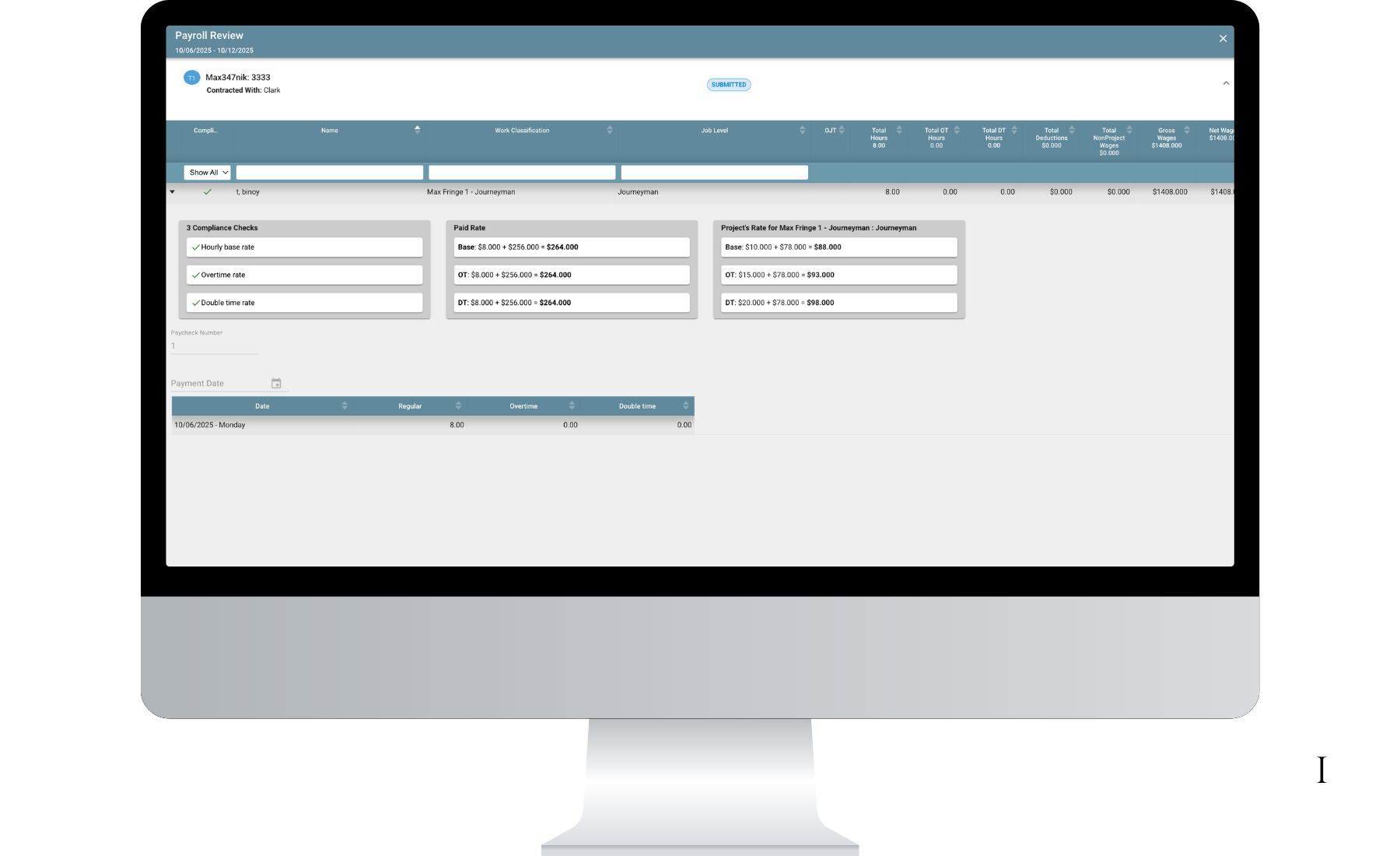
Click through InSight IQ yourself. No form. No commitment. Watch fringe benefit rates apply to a prevailing wage project, see annualization calculated automatically, and verify cash-in-lieu and bona fide plan compliance in real time.

Take a tour of InSight IQ

Fringe Annualization Cash vs. Bona Fide Plan Tracking Split-Funded Fringe Compliance WH-347 Fringe Reporting

Prefer a guided walkthrough with a compliance specialist? Request a live demo →

Trusted by contractors tracking fringe benefits on Davis-Bacon and state prevailing wage projects

THE CHALLENGE

Fringe Benefits Are the Most Misunderstood Line on the WH-347

Most contractors can handle base wage rates. It’s the fringe side — annualization, cash-in-lieu, split-funded plans, hourly equivalents — that creates audit findings, triggers back-pay, and keeps compliance teams up at night.

Annualization Is a Math Problem Nobody Wants

To calculate the hourly fringe credit for a bona fide plan, you divide total annual contributions by total hours worked across ALL projects — Davis-Bacon and non-Davis-Bacon. Get the denominator wrong and you’re either underpaying fringes (audit finding) or overpaying with no way to recover it.

Cash vs. Plan vs. Both

Contractors can pay fringes as cash-in-lieu, into bona fide plans, or as a split — and every option has different documentation requirements. Most teams track this in spreadsheets that don’t connect to payroll, don’t update when rates change, and can’t survive a DOL audit.

The WH-347 Fringe Line Is the Audit Trigger

Auditors know where to look. The fringe benefit line on the WH-347 is the most common source of certified payroll errors — wrong hourly rate, missing plan documentation, or annualization that doesn’t add up. One wrong fringe line can unravel an entire project’s compliance.

THE PLATFORM

Every Fringe Benefit Scenario — Calculated, Tracked, and Documented

Automatic annualization calculation using actual hours and contributions
Davis-Bacon and non-Davis-Bacon hours included in the denominator
Per-worker, per-trade fringe credit tracking across all projects
Mid-year recalculation when plan contributions or hours change
Annualization audit trail with timestamped calculation history
Cash-in-lieu calculation and payroll integration
Bona fide plan verification against DOL requirements
Split-funded fringe tracking (cash + plan combination)
Per-worker fringe payment method documentation
Automatic fringe shortfall alerts when payments fall below required rates
Auto-populated fringe rates on WH-347 (new + legacy form versions)
Fringe payment method documentation (cash, plan, or split) per worker
Pre-submission validation of fringe rates against wage determination
Fringe benefit statement of compliance auto-generation
Supporting plan documentation linked to each certified payroll
Fringe benefit summary reports by project, trade, or worker
Annualization audit reports with calculation methodology
Fringe shortfall and overpayment analysis
Year-over-year fringe trend reporting for plan renewals
Export to PDF, Excel, or direct submission to agencies

WHY SKILLSMART

Fringe Benefits Deserve Their Own System. This Is It.

01

Annualization That Actually Works

Most tools ignore annualization or force you to calculate it offline. SkillSmart pulls actual plan contributions and total hours — DBA and non-DBA — to compute the correct hourly credit automatically. When plans renew or hours shift mid-year, the calculation updates in real time.

02

Every Payment Method, One Workflow

Cash-in-lieu, bona fide health plan, pension, 401k, vacation fund, apprenticeship training — or any combination. SkillSmart tracks every fringe payment method against the required rate and documents the split for every worker, every pay period, every project.

03

Fringe Shortfall Prevention

SkillSmart alerts you before a fringe shortfall becomes an audit finding. If a worker’s annualized fringe credit drops below the required rate — because hours changed, a plan renewed, or contributions were missed — you see it immediately and can cure before the next WH-347 filing.

04

New + Legacy WH-347 Support

SkillSmart supports both the new and legacy WH-347 form versions. Fringe benefit data auto-populates on both — same accuracy, same documentation, same validation. Projects that started on the old form transition seamlessly.

05

Human Compliance Specialists

Every customer gets a dedicated compliance specialist who configures your fringe benefit setup, verifies your annualization methodology, and supports you through DOL audits. Not a chatbot — a person who understands Davis-Bacon fringe requirements.

06

Your Data, Your Control

Export every fringe calculation, every plan verification, every compliance report anytime. SOC 2 Type II certified. Your data stays yours — critical when auditors need fringe documentation years after project completion.

HOW WE COMPARE

Why Contractors Choose SkillSmart for Fringe Benefit Compliance

Fringe as a First-Class Feature

Most compliance platforms treat fringe benefits as a single field on a payroll form. SkillSmart treats fringe as what it is — a complex, multi-method, auditable compliance requirement that deserves its own tracking, its own validation, and its own reporting.

Annualization Built In

Competitors that handle fringe at all expect you to calculate annualization offline and enter the result manually. SkillSmart computes annualization automatically from actual plan data and hours worked — and recalculates when inputs change.

Connected to Certified Payroll

Fringe calculations that live in a spreadsheet disconnected from your WH-347s create errors. SkillSmart connects fringe tracking directly to certified payroll — so the fringe line on every WH-347 matches the underlying plan data, every time, automatically.

99.8%
fringe benefit audit accuracy
50
state fringe rules maintained
2-3
days to implement

What Our Clients Say

JH

“The platform has provided a strong foundation for managing Davis-Bacon compliance, and it has helped streamline the tracking and reporting of certified payroll in a more structured and transparent way. Having a centralized system has significantly improved our ability to maintain consistency across subcontractors and ensure documentation is properly captured. The system’s ability to capture fringe benefit data and reflect it appropriately in reporting has been a major benefit.”

Jess Bridenback

Haydon Construction

FREQUENTLY ASKED

Fringe Benefit Compliance FAQs

Answers to the questions contractors, payroll teams, and compliance managers ask most about prevailing wage fringe benefits, annualization, and bona fide plan tracking on Davis-Bacon projects.

What are prevailing wage fringe benefits?

Prevailing wage fringe benefits are the additional compensation — beyond the base hourly wage — that contractors must pay on Davis-Bacon and state prevailing wage projects. Fringes can be paid as cash-in-lieu (added to the paycheck), into bona fide benefit plans (health insurance, pension, 401k, vacation), or as a combination. The required fringe rate is set by the wage determination for each project. SkillSmart tracks every fringe dollar against that rate automatically.

How does Davis-Bacon define fringe benefits?

Under Davis-Bacon, fringe benefits include employer contributions to health insurance, pension, 401k, vacation, apprenticeship training, and other bona fide plans. Contractors can satisfy the fringe requirement by paying into qualified plans, paying cash-in-lieu, or a combination — as long as the total meets or exceeds the fringe rate in the wage determination. Plans must meet DOL requirements for bona fide status.

Does SkillSmart handle fringe benefit annualization?

Yes. SkillSmart automates annualization by dividing total annual plan contributions by total hours worked across all projects (Davis-Bacon and non-Davis-Bacon). The calculation updates in real time as hours accrue and plan contributions change. Mid-year plan renewals, rate changes, and hour fluctuations are handled automatically — no offline spreadsheets required.

Can SkillSmart track split-funded fringe benefits?

Yes. Many contractors pay fringes through a combination of bona fide plans and cash supplements. SkillSmart tracks both components separately, calculates the hourly credit for each, and verifies that the total meets the required fringe rate. The split is documented on every WH-347 and in fringe compliance reports.

Does fringe data auto-populate on the WH-347?

Yes. SkillSmart auto-populates fringe rates, payment methods, and plan details on every WH-347 — both new and legacy form versions. The fringe benefit section is pre-validated against the wage determination before submission, so the most audited line on the form is always accurate and documented.

Do other compliance platforms handle fringe benefit tracking?

Most compliance platforms treat fringe benefits as a single input field — you calculate the rate offline and enter it manually. None offer dedicated annualization engines, split-funded tracking, or bona fide plan verification. SkillSmart is the only platform that treats fringe benefits as a first-class compliance feature with its own tracking, validation, and reporting.

How quickly can SkillSmart set up our fringe benefit tracking?

Most contractors are fully operational in 2-4 weeks. Your dedicated compliance specialist configures your fringe benefit plans, sets up annualization parameters, and verifies your methodology against DOL requirements. Existing fringe data can be migrated to provide continuity on projects already in progress.

Still have questions?

Talk to a compliance specialist in a 15-minute walkthrough. No form wall, no sales pressure — just straight answers about your fringe benefit tracking setup.

Request a Demo

— OR —

Contact our team →

15 min
Average demo length. No slides. Just the product.

Stop Guessing on Fringe. Start Documenting It.

Get a 15-minute walkthrough of InSight IQ. See exactly how SkillSmart tracks fringe benefit annualization, cash-in-lieu, bona fide plans, and split-funded fringes — and produces the documentation that survives a DOL audit.

15-min walkthrough · No commitment · SOC 2 Type II certified